Edit Persona
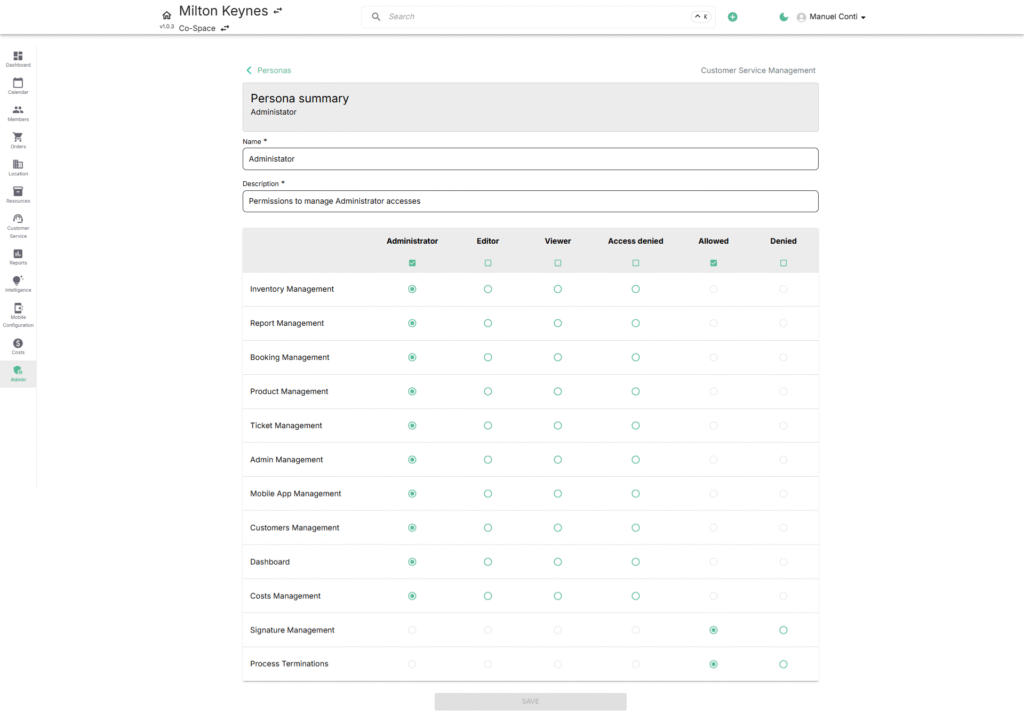
The Edit Persona page provides a granular control panel where you define exactly what a role can administrate, edit, or view across system modules.
The grid view is the heart of Persona management:
- Rows = Modules (functional areas like Inventory, Reports, Bookings etc).
- Columns = Roles/Permission Levels (Administrator, Editor, Viewer, Access Denied, Allowed, Denied).
- Checkboxes = Access rights per module.
Header Fields
- Name → The title of the role (e.g., Editor, Viewer).
- Description → Short explanation of this persona’s purpose.
Permission Grid Explained
Each module row corresponds to a functional area of the platform. For each, you can assign role capabilities by ticking one or more access levels:
🔹 Roles (Columns)
- Administrator → Full control, including editing, deleting, and configuration.
- Editor → Modify and update records but cannot alter global settings.
- Viewer → Read-only access (cannot add, edit, or delete).
- Access Denied → Blocks access to that module entirely.
- Allowed/Denied (override toggles) → Fine-tuned control when a module allows custom access beyond the standard three roles.