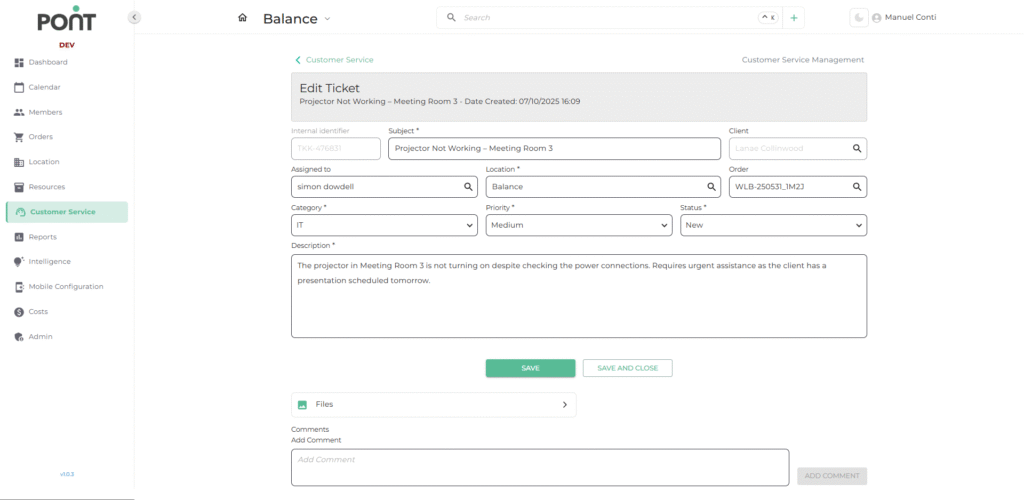
📑 Fields to manage ticket
- Internal Identifier
- Auto-generated unique ticket ID that cannot be modified.
- Used for tracking and referencing the ticket in the system.
- Subject
- A concise title describing the core issue or request.
- Helps in quick identification of the ticket.
- Client
- Displays the name of the client or company who raised the issue.
- Links the ticket to the relevant customer record.
- Assigned To
- Select the person responsible for resolving the ticket.
- Ensures accountability and proper task delegation.
- Location
- Indicates the branch or site where the issue is reported.
- Useful for assigning local staff and logistics planning.
- Order
- (Optional) Links the ticket to a specific client order if applicable.
- Helps in associating the ticket with ongoing contracts or service delivery.
- Category
- Defines the nature of the issue. (Eg: Aircon, IT).
- Used for reporting and prioritizing similar types of issues.
- Priority
- Determines the urgency of the issue.
- Levels: High / Medium / Low.
- Guides the team to address critical tickets first.
- Status
- Indicates the current stage of the ticket.
- Common stages: New, In Progress, Done.
- Description
- Detailed explanation of the issue, providing context for the assigned staff.
- Should include any troubleshooting steps already attempted.
- Files
- Allows attachments (e.g., images, PDFs, reports) for evidence or further context.
- Comments
- Enables collaboration by letting staff add progress updates or notes.
- Useful for internal communication and maintaining ticket history.