Customer Service Overview
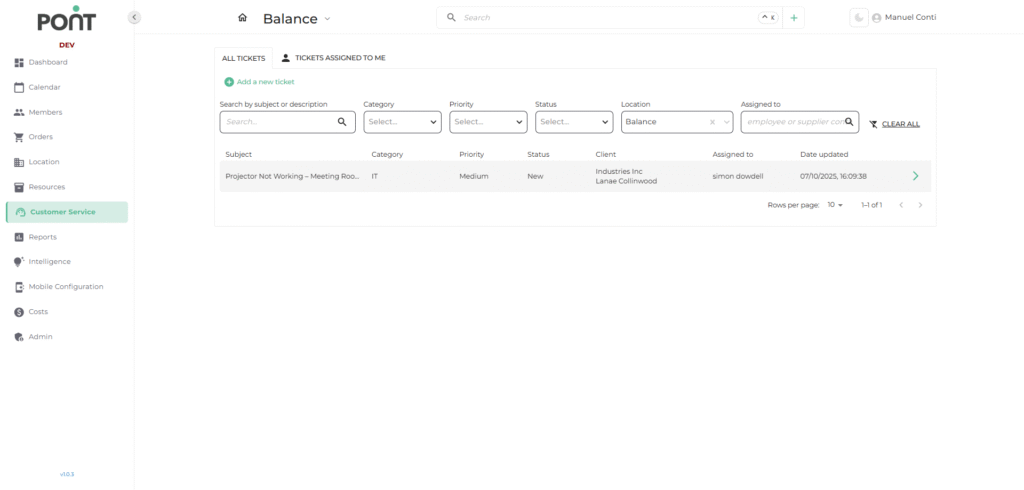
The Customer Service module is designed to help operators manage client queries, support requests, and internal tasks. It centralizes ticket management by allowing you to create, assign, track, and resolve issues efficiently.
🔑 Key Features
- All Tickets Tab
Displays all tickets created within the system for the selected location(s). - Tickets Assigned to Me Tab
Displays only the tickets assigned to the currently logged-in user for quick follow-up. - Filters & Search
- Search by Subject or Description: Quickly locate a ticket by typing keywords.
- Category: Filter tickets by predefined types (e.g. Aircon, IT).
- Priority: View tickets based on urgency (e.g., High, Medium, Low).
- Status: Filter by progress (e.g., New, In Progress, Resolved, Closed).
- Location: Narrow down tickets based on a specific branch or site.
- Assigned To: Search for tickets assigned to a specific employee or supplier.
- Clear All: Reset all applied filters to see the full ticket list.
- Ticket List Columns
- Subject: Brief description of the ticket’s purpose.
- Category: Type of issue or request.
- Priority: Urgency assigned to the ticket.
- Status: Current progress of the ticket.
- Client: Associated client or company.
- Assigned To: Employee or supplier responsible for handling the ticket.
- Date Updated: Last modification date of the ticket.