Add Pass
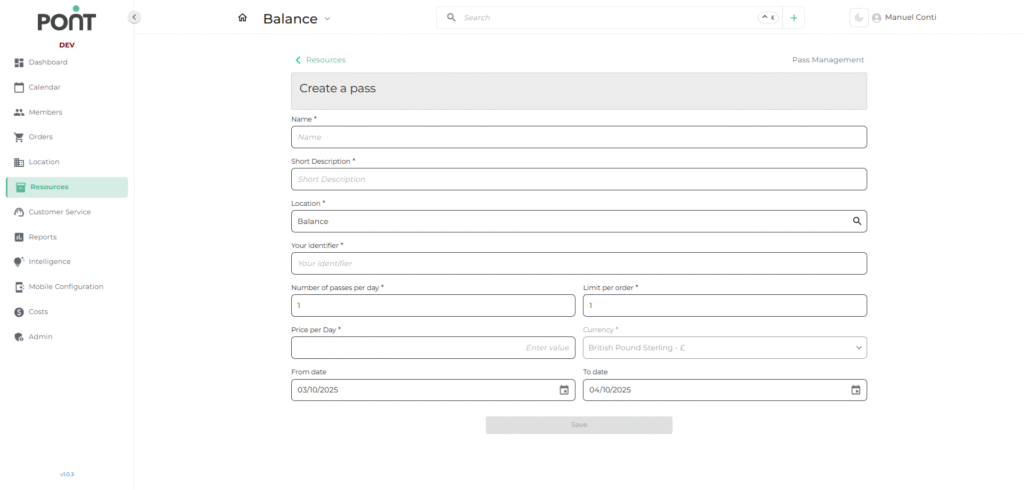
The Add Passes feature allows operators to create flexible access options for members and guests. Passes can be configured for day passes, drop-in options, or quick access passes, making it easy to accommodate diverse usage needs.
📋 Fields & Descriptions
- Name – The title of the pass as it appears in the system and for customers.
- Short Description – A brief summary describing the purpose or benefits of the pass.
- Location – Specifies the branch or site where the pass is valid and ensure the pass is tied to correct workspace.
- Your Identifier– A unique internal code or reference for tracking passes in the system.
- Number of Passes per Day – Defines how many passes can be sold or used in a single day to manage capacity.
- Limit per Order – Specifies the maximum number of passes a single customer can purchase in one order.
- Price per Day – Sets the cost of the pass for a single day.
- Currency – Defines the currency in which the pass is priced.
- From Date / To Date – Specifies the date range during which the pass is valid and is useful for promotional passes, seasonal offers, or limited-time access.