Space’s Overview
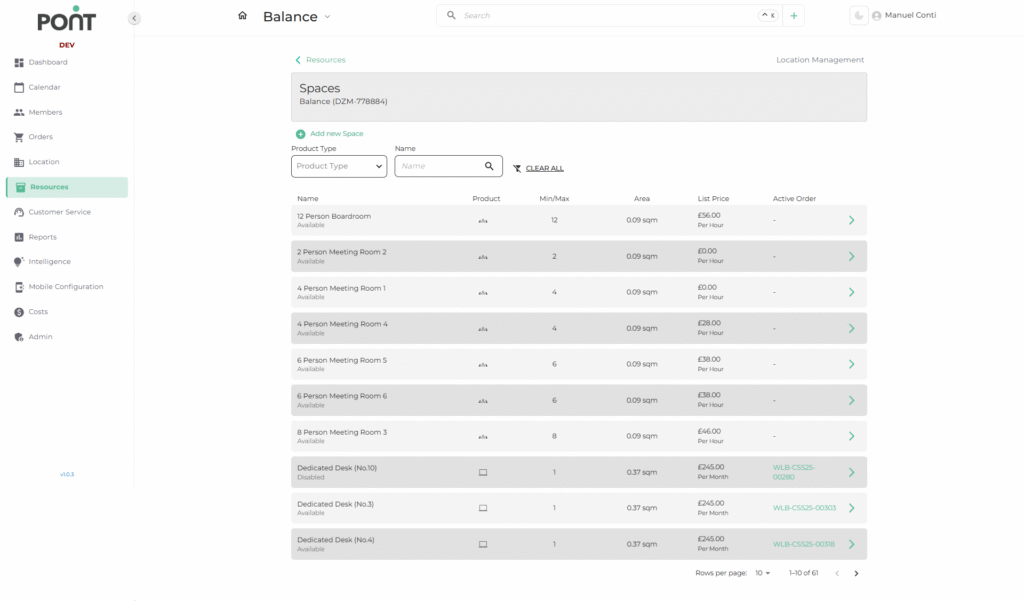
The Spaces Section under the Resources module focuses on managing all bookable and non-bookable spaces such as meeting rooms, dedicated desks, and private offices.
🔑 Key Features
- Product Type Filter: Narrow down results by selecting a specific space type (e.g., Meeting Rooms, Dedicated Desks).
- Search by Name: Quickly find a specific space by typing its name.
- Clear All: Reset all applied filters instantly for a full view.
- Quick Actions:
- ➕ Add New Space: Create a new space entry.
- ➡ Expand Icon: Open full details of a selected space for editing or review.
📑 Fields in the Spaces List
- Name: The designated name of the space.
- Product Type: The category to which the space belongs.
- Min/Max Capacity: Indicates the occupancy range supported by the space.
- Area (sqm): Displays the physical size of the space.
- List Price: Shows the pricing details (e.g., per hour, per day, or per month).
- Active Order: Displays the reference of any linked active contract or booking.