Location’s Overview
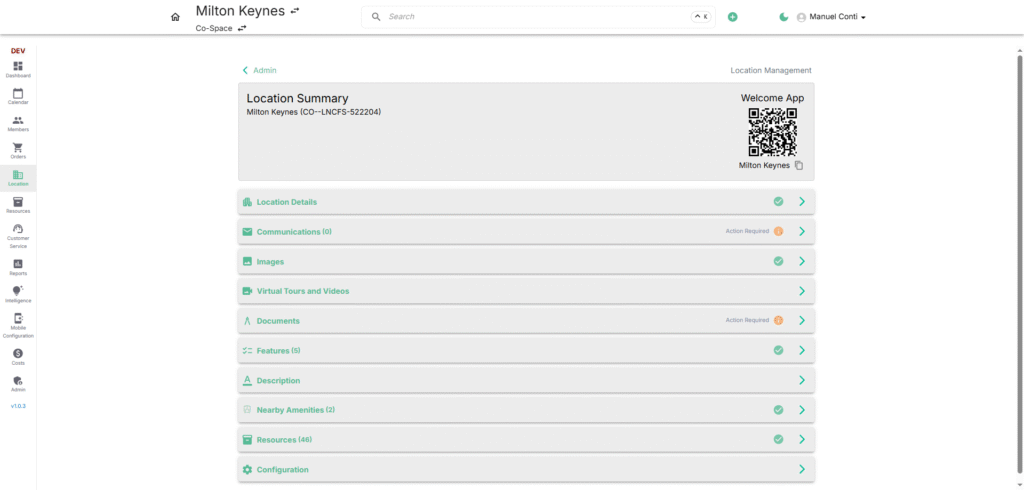
The Location Overview provides operators with a centralized hub to manage all details related to a specific workspace location. It consolidates key information, assets, and configurations into one screen, ensuring seamless administration.
🔹 Location Summary
- Displays Location Name and Unique Identifier Code.
- Provides a QR Code for quick access to the location’s Welcome App to Check-In and Check-Out.
- Shows the status of setup for different sections (✅ Completed / ⚠️ Action Required).
🔹 Sections in Location Overview
1. 🏢 Location Details
- Core details about the workspace (e.g., address, contact information) including basic identification used across the system.
2. ✉️ Communications
- Centralized log of location communications (emails, phone numbers, social accounts, websites).
3. 🖼️ Images
- Upload and manage images of the location including main images, additional images and brand logo which helps with branding, customer visibility, and marketing.
4. 🎥 Virtual Tours & Videos
- Add virtual walkthroughs and videos for the workspace which are useful for marketing and remote customer on-boarding.
5. 📂 Documents
- Upload and store location-specific documents (Terms & Conditions, Floor Plans, FAQ’s, Joining Instructions, Contract Templates).
6. ⚙️ Features
- Manage workspace features such as Accessibility, Community, Parking, Catering, Health-Facilities etc.
7. 📝 Description
- Add or update descriptive text about the location.
8. 🗺️ Nearby Amenities
- Register near by amenities like restaurants, cafes, transport links to support members by showing what’s around the workspace.
9. 🏗️ Resources
- Define and manage resources linked to this location
10. 🔧 Configuration
- Manage configurations specific to this location like variants, base prices, operational details and invoicing setup.