Order’s Overview
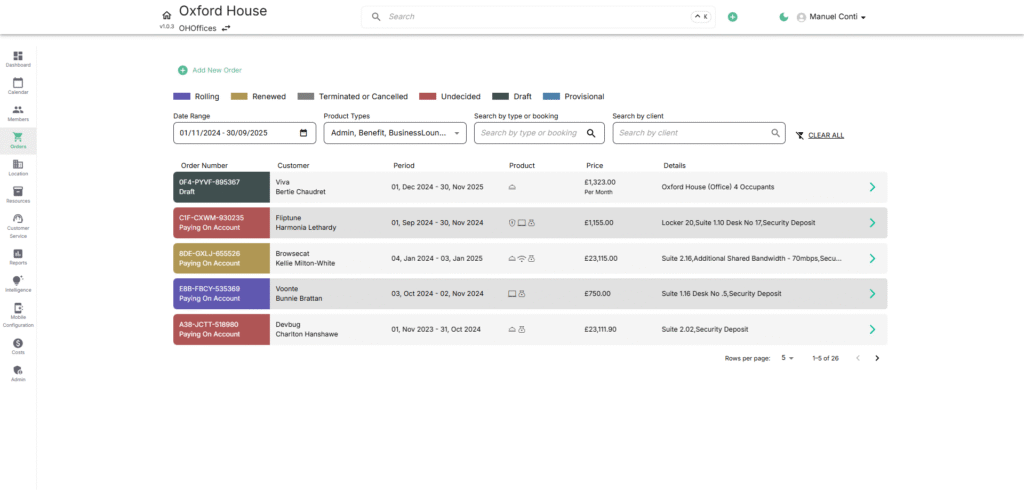
Manage all financial transactions—recurring contracts, provisional bookings, and one-time charges—in one place. The Orders module centralizes contracts and transactions for members and companies, covering everything from co-working desks to meeting rooms. It defines terms, billing cycles, and payments while powering billing, renewals, and invoicing, giving operators complete visibility into revenue streams.
✨ Key Highlights:
- 🔗 Order Lines: Each order can contain one or more order lines (individual products/services).
- 📅 Billing Cycles: Define start/end dates, payment schedules, and recurring charges.
- 🧾 Invoices: Automatically linked and generated from orders.
- 🎨 Status Tracking: Visual color-coded statuses show the lifecycle stage of an order.
🎨 Order Status (Color-Coded)
- Rolling (Purple): An active contract that continues automatically until cancelled.
- Renewed (Yellow): A contract successfully extended beyond its initial end date.
- Terminated/Cancelled (Light Gray): Order ended before completion or manually cancelled.
- Undecided (Red): Pending action from the customer or operator before confirmation.
- Draft (Dark Gray): Order is being created but not finalised.
- Provisional (Light Blue): Temporarily reserved but awaiting confirmation or payment.
🔎 Filters & Controls
- Date Range → Shows orders within a specific time frame.
- Product Types → Narrow down by services (e.g., Admin, Telephone, Co-Working, Meeting Rooms, Virtual Offices, Benefits, etc.).
- Search by Type/Booking → Locate orders by product/service keywords.
- Search by Client → Quickly find all orders linked to a specific customer or company.
📑 Fields in the Order List
- Order Number – Unique identifier for each order with status label and color-coding.
- Customer – Company or individual tied to the order along with the primary contact.
- Period – Contract start and end dates defining the billing duration.
- Product – Type of service included, with icons representing product categories.
- Price – Cost of the order with specified billing frequency.
- Details – Additional specifics such as suite, desk, or service information.