Staff Details
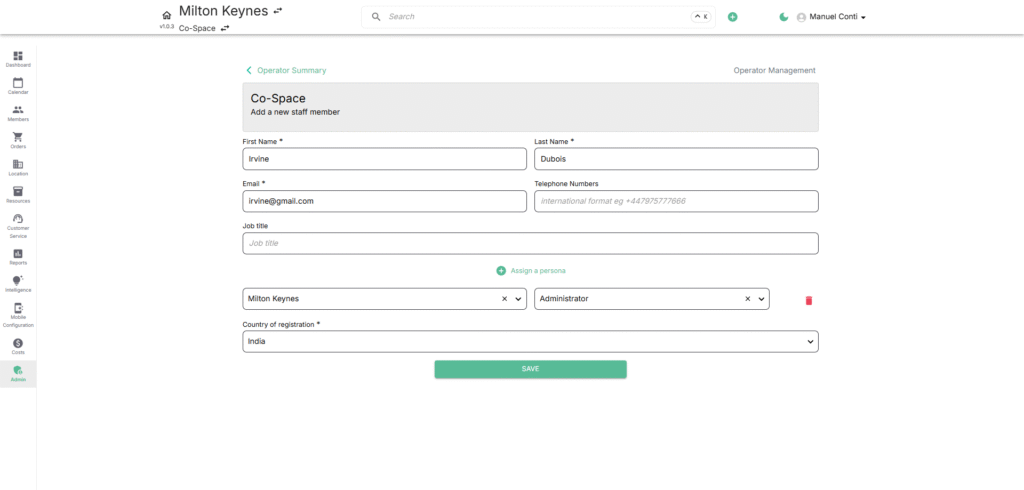
Navigate to Operators → Operator Details → Contact Management → Staff Details
➕ Add Staff
Adding new staff ensures smooth onboarding and access to the right systems.
Steps to Add Staff:
- Click Add a new staff member.
- Fill in the required details:
- First Name & Last Name – Identity of the staff member.
- Email – Login and communication credential.
- Telephone Numbers – Optional, used for contact purposes.
- Job Title – Role description (e.g., Venue Manager, Ops Lead).
- Assign Persona (Role): Choose from predefined roles (e.g., Administrator, Editor) that determine permissions. Multiple personas can be assigned to a single location/ All locations
- Assign Location: Link the staff to one or multiple venues or business units.
- Select the Country of Registration.
- Click Save to finalize the staff profile.
✏️ Edit Staff
Editing staff details allows updates to roles, locations, and user information as responsibilities evolve.
Steps to Edit Staff:
- Select the staff member from the Staff Overview list.
- Update fields as required:
- Name, Email, Job Title, Phone.
- Assigned Personas (roles).
- Venue/Location assignments.
- Country of Registration.
- Save the changes.