Calendar’s Overview
📅 Horizontal Calendar View
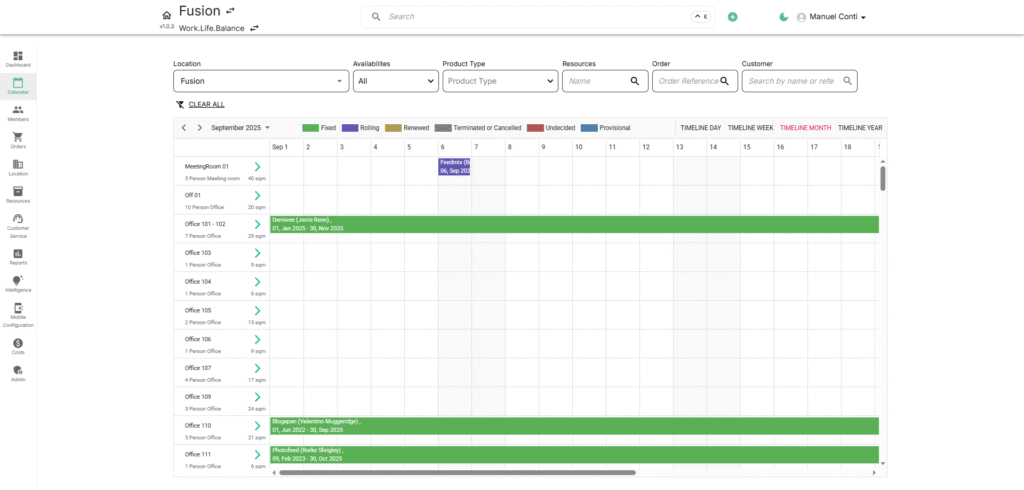
The Horizontal Calendar View provides a complete overview of bookings, events, and resource availability across all venues. It’s designed as a central hub where you can view, manage, and control reservations with ease.
🌟 Key Features & Timeline Views
It covers multiple timeline views to suit your planning style:
- Day View: Focus on bookings scheduled for a single day.
- Week View: Quickly scan activities and allocations for the entire week.
- Month View: Get a broader perspective of room usage and upcoming events.
- Year View: Track long-term allocations, contracts, and resource planning.
🗓️ Vertical Calendar View
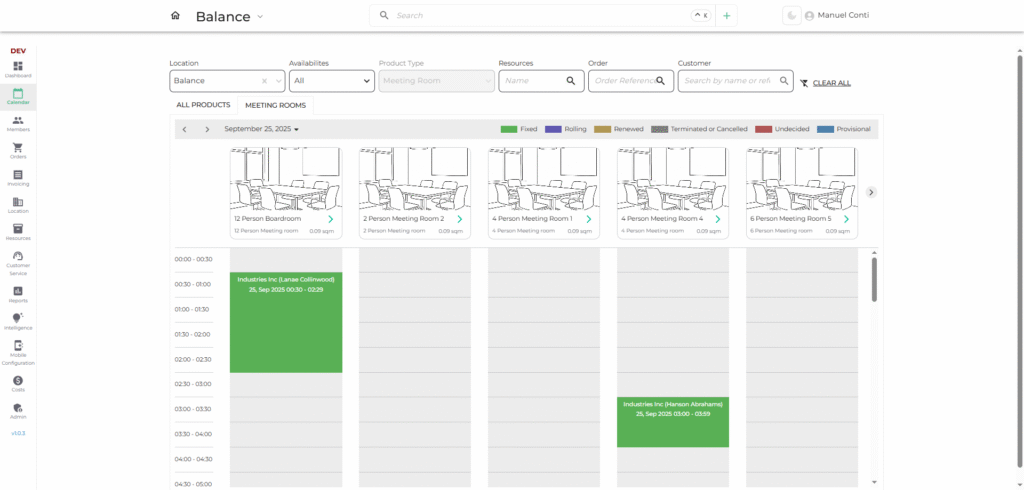
The Vertical Calendar View is designed exclusively for Meeting Rooms, providing an intuitive, time-based breakdown of bookings for better daily scheduling and quick room allocation.
🌟 Key Features
- Resource Columns – Each column represents a specific meeting room.
- Vertical Time Slots – Time flows top-to-bottom in hourly or half-hourly increments.
- Quick Glance Booking View – See all meeting room reservations stacked vertically by time.
- Overlap Detection – Easily identify if two bookings overlap within the same or different rooms.
- Instant Adjustments – Operators can quickly spot availability gaps to add or modify reservations.
🎛️ Filters & Navigation
Easily refine your calendar display with powerful filters:
- Location Filter: Select specific sites (e.g., Milton Keynes) to see localised schedules.
- Availability Filter: Show all bookings or filter by availability type (Available/ Unavailable).
- Product Type Filter: Narrow results to meeting rooms, private offices, or other product type categories.
- Resource Search: Find a room or resource instantly by typing its name.
- Order / Customer Search: Look up bookings using order reference or customer details.
👉 Navigation Controls allow you to:
- Move forward/backward across dates.
- Jump to today’s schedule instantly.
- Toggle between timeline views.
🏷️ Booking Status Indicators
Color-coded booking statuses make it easy to interpret the calendar at a glance:
- ✅ Fixed – Confirmed and finalized booking.
- 🔄 Rolling – Ongoing flexible booking.
- 🔁 Renewed – Extended reservation.
- ❌ Terminated/Cancelled – Ended booking.
- ❔ Undecided – Awaiting confirmation.
- 📝 Provisional – Tentative hold on the resource.