Quick Lookup — Search Smarter, Shortcut Faster
🔎 Global Search Overview
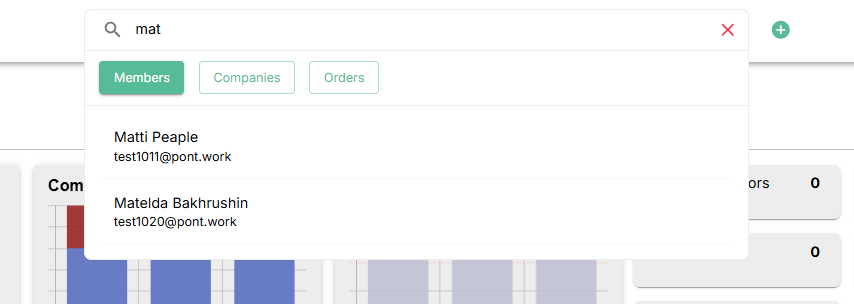
The Global Search is your command center for finding anything across the platform in seconds. No more digging through menus — simply type what you need and jump straight to the result. Whether you’re looking for a member, a company, or an order, everything is just a few keystrokes away.
And the best part? You can summon the search panel anytime with the shortcut ^K (Ctrl + K) — lightning-fast access right at your fingertips. ⚡
✨ Key Features
- Keyword Search
Type a member name, company, or order ID, and results will appear instantly as you type. Real-time filtering ensures you never waste a moment searching. - Smart Entity Tabs
Results are neatly organised into three categories for clarity:- 👤 Members → Find individuals and access their profiles.
- 🏢 Companies → Quickly locate company records.
- 📦 Orders → Pull up orders and track their details.
- Quick Access Shortcut
Wherever you are on the platform, press ^K (Ctrl + K) to open the search panel instantly — just like a power user’s command palette. - Clear Search
Need a fresh start? One click on the ❌ icon resets your search field and closes results.
🛠️ Shortcut’s Hub
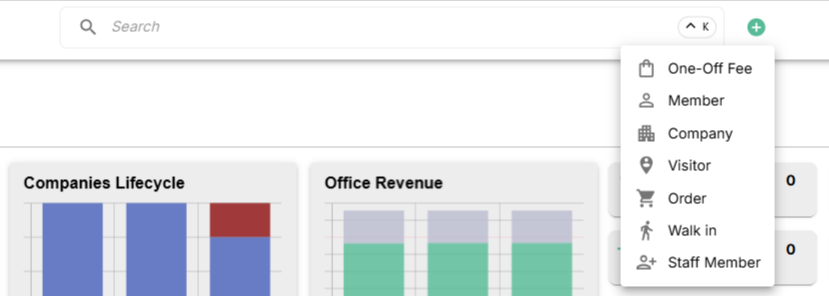
Instantly perform key tasks with system shortcuts—no searching required. Save time by navigating, creating, or updating content with a single keystroke. Each shortcut triggers an action directly in the platform, making workflow faster and smoother.
✨ Key Features
- Comprehensive Coverage: Supports core entities like One-Off Fees, Members, Companies, Visitors, Orders, and Walk-ins.
- Time Saver: Skip repetitive clicks and perform common tasks efficiently.
- Add New Items Quickly: Create new entries without leaving your current page.
📌 Quick Actions
- One-Off Fee: A standalone charge not tied to a membership or booking, such as printing, setup, or ad-hoc services.
- Member: An individual or a Company employee with an active membership plan, providing them access to spaces or services on a recurring basis.
- Company: A business entity that may have one or more associated members, bookings, or billing profiles.
- Visitor: A temporary guest associated with a member or company, typically with limited access and for short durations.
- Order: A confirmed transaction for a product, service, or booking — includes payment details and billing.
- Walk-in: A person who uses the space without a prior booking or membership, usually for short-term or on-the-spot usage. The wizard allows for a complete onboarding.
- Staff Member: A quick way to onboard a new staff member by assigning details, role (Persona), and linking them to venues for access.